Create a new document. Save it (inside your workspace) as - let's say - html_insert.php (you can choose any other filename, too). Select all text inside html_insert.php (because we will replace it with the new content).
<?php

//
// ParseProGo - PHP-Editor
//
// [time & date]
//


?>
Make sure that HTML -> Parameters is unchecked.
Choose HTML -> Insert -> <doctype> -> html -> strict.
Place the cursor between <html> and </html>. Your document should look like this:<!DOCTYPE HTML PUBLIC "-//W3C//DTD HTML 4.01//EN" "http://www.w3.org/TR/html4/strict.dtd"> <html> | </html>
Choose HTML -> Insert -> <head> -> general. Place the cursor between <head> and </head>.
<!DOCTYPE HTML PUBLIC "-//W3C//DTD HTML 4.01//EN"
	"http://www.w3.org/TR/html4/strict.dtd">
<html>


<head>
|
</head>


</html>
Turn HTML -> Parameters ON.
Choose HTML -> Insert -> <head> -> meta-tags.
Replace the question-marks:
Place the cursor between <meta name="copyright" content="open source"> and </head>. Your document should look like this:
<!DOCTYPE HTML PUBLIC "-//W3C//DTD HTML 4.01//EN"
	"http://www.w3.org/TR/html4/strict.dtd">
<html>


<head>


	<meta name="keywords" content="just, a, test">
	<meta name="description" content="This is a test">
	<meta name="robots" content="index, follow">

	<meta name="language" content="en">
	<meta name="audience" content="all">
	<meta name="distribution" content="global">
	<meta name="generator" content="ParseProGo">
	<meta name="revisit-after" content="7 days">
	<meta name="copyright" content="open source">
|

</head>


</html>
Choose HTML -> Insert -> <head> -> css.
Choose HTML -> Insert -> <head> -> javascript. Place the cursor in the line after </head>. Your document should look like this:
<!DOCTYPE HTML PUBLIC "-//W3C//DTD HTML 4.01//EN"
	"http://www.w3.org/TR/html4/strict.dtd">
<html>


<head>


	<meta name="keywords" content="just, a, test">
	<meta name="description" content="This is a test">
	<meta name="robots" content="index, follow">

	<meta name="language" content="en">
	<meta name="audience" content="all">
	<meta name="distribution" content="global">
	<meta name="generator" content="ParseProGo">
	<meta name="revisit-after" content="7 days">
	<meta name="copyright" content="open source">

<style type="text/css">
.text {
	font-family: sans-serif;
	line-height:1.2em;
	font-size: 13px;
	color: #736832;
}

a:link {
	color: #736832;
	text-decoration: none;
}
a:visited {
	color: #736832;
	text-decoration: none;
}
a:hover {
	color: #500000;
	text-decoration: none;
	background-color: #736832;
}
a:active {
	text-decoration: none;
}
</style>

<script type="text/javascript">
var answer;

function template (optional_parameter) {
	if (optional_parameter)
		var example = prompt("Do you like ParseProGo?", answer);
}
</script>


</head>
|


</html>
Choose HTML -> Insert -> <body> -> general.
Replace background: #FFFFFF with background: #DDDBD4<body style="margin: 48px; background: #DDDBD4" onload="template(0)">
Turn HTML -> Parameters OFF. Place the cursor between <body> and </body>.
Let's test the file by typing 'Hello World' or something like this. Save html_insert.php, and click preview extern. The result should be similar to:
Now we will change onload="template(0)" to onload="template(1)", and delete 'Hello World'. Your document should look like this:
<!DOCTYPE HTML PUBLIC "-//W3C//DTD HTML 4.01//EN"
	"http://www.w3.org/TR/html4/strict.dtd">
<html>


<head>


	<meta name="keywords" content="just, a, test">
	<meta name="description" content="This is a test">
	<meta name="robots" content="index, follow">

	<meta name="language" content="en">
	<meta name="audience" content="all">
	<meta name="distribution" content="global">
	<meta name="generator" content="ParseProGo">
	<meta name="revisit-after" content="7 days">
	<meta name="copyright" content="open source">

<style type="text/css">
.text {
	font-family: sans-serif;
	line-height:1.2em;
	font-size: 13px;
	color: #736832;
}

a:link {
	color: #736832;
	text-decoration: none;
}
a:visited {
	color: #736832;
	text-decoration: none;
}
a:hover {
	color: #500000;
	text-decoration: none;
	background-color: #736832;
}
a:active {
	text-decoration: none;
}
</style>

<script type="text/javascript">
var answer;

function template (optional_parameter) {
	if (optional_parameter)
		var example = prompt("Do you like ParseProGo?", answer);
}
</script>


</head>

<body style="margin: 48px; background: #DDDBD4"onload="template(1)">

|

</body>


</html>
Choose HTML -> Insert -> <body> -> iframe.
Replace ADRESS with http://www.mentalmove.com/bine/?value=fifteen(2) (or any other website's adress you want to have displayed here)<iframe id="" src="http://www.mentalmove.com/bine/?value=fifteen(2)" name="framy" height="192" width="720" scrolling="auto"></iframe>
Place the cursor in the line before </body>. Type <br><br> and enter twice Return (to create newlines).
Choose HTML -> Insert -> <body> -> image.
Replace ADRESS with http://www.mentalmove.com/bine/needful_things/puzzle2.jpg (or any other image's adress you want to have displayed here) and ALTERNATIVE TITLE with Sliding Puzzle (or any other title). The tag should look like this:
<img src="http://www.mentalmove.com/bine/needful_things/puzzle2.jpg" alt="Sliding Puzzle">
Place the cursor in the line before </body>. Type <br><br> and enter twice Return (to create newlines).
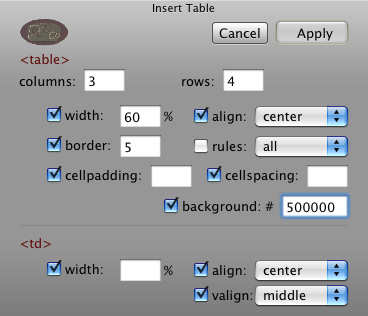
Choose HTML -> Insert -> <body> -> table... with the following values:
Click Apply.
Inside the table, enter the following values:
<table width="60%" border="5" cellpadding="10" cellspacing="10" style="background: #500000" align="center"> <tr> <td width="33%" align="center" valign="middle"> The value of </td> <td width="33%" align="center" valign="middle"> 'td width' can be set </td> <td width="33%" align="center" valign="middle"> automatically </td> </tr> <tr> <td align="center" valign="middle"> </td> <td align="center" valign="middle"> </td> <td align="center" valign="middle"> </td> </tr> <tr> <td align="center" valign="middle"> </td> <td align="center" valign="middle"> </td> <td align="center" valign="middle"> </td> </tr> <tr> <td align="center" valign="middle"> </td> <td align="center" valign="middle"> Do you have questions? </td> <td align="center" valign="middle"> feedback </td> </tr> </table>
Choose HTML -> Format... Check Keep open. Select (one by one) 'The value of', 'can be set', 'automatically', and 'Do you have questions?', and click (each time) Span (in the HTML Format-Tags Window).
Select 'feedback' and click Link (in the HTML Format-Tags Window). Close the HTML Format-Tags Window by clicking Cancel.
Replace LINK_ADRESS with mailto:feedback@mentalmove.com
Delete target="_self".
Replace each <span> with <span class="text"> (either manually or with Find&Replace). Your document should look like this:
<!DOCTYPE HTML PUBLIC "-//W3C//DTD HTML 4.01//EN"
"http://www.w3.org/TR/html4/strict.dtd">
<html>
<head>
<meta name="keywords" content="just, a, test">
<meta name="description" content="This is a test">
<meta name="robots" content="index, follow">
<meta name="language" content="en">
<meta name="audience" content="all">
<meta name="distribution" content="global">
<meta name="generator" content="ParseProGo">
<meta name="revisit-after" content="7 days">
<meta name="copyright" content="open source">
<style type="text/css">
.text {
font-family: sans-serif;
line-height:1.2em;
font-size: 13px;
color: #736832;
}
a:link {
color: #736832;
text-decoration: none;
}
a:visited {
color: #736832;
text-decoration: none;
}
a:hover {
color: #500000;
text-decoration: none;
background-color: #736832;
}
a:active {
text-decoration: none;
}
</style>
<script type="text/javascript">
var answer;
function template (optional_parameter) {
if (optional_parameter)
var example = prompt("Do you like ParseProGo?", answer);
}
</script>
</head>
<body style="margin: 48px; background: #DDDBD4"onload="template(1)">
<iframe id="" src="http://www.mentalmove.com/bine/?value=fifteen(2)"
name="framy" height="192" width="720" scrolling="auto"></iframe>
<br><br>
<img src="http://www.mentalmove.com/bine/needful_things/puzzle2.jpg" alt="Sliding Puzzle">
<br><br>
<table width="60%" border="5" cellpadding="10" cellspacing="10" style="background: #500000" align="center">
<tr>
<td width="33%" align="center" valign="middle">
<span class="text">The value of</span>
</td>
<td width="33%" align="center" valign="middle">
'td width' <span class="text">can be set</span>
</td>
<td width="33%" align="center" valign="middle">
<span class="text">automatically</span>
</td>
</tr>
<tr>
<td align="center" valign="middle">
</td>
<td align="center" valign="middle">
</td>
<td align="center" valign="middle">
</td>
</tr>
<tr>
<td align="center" valign="middle">
</td>
<td align="center" valign="middle">
</td>
<td align="center" valign="middle">
</td>
</tr>
<tr>
<td align="center" valign="middle">
</td>
<td align="center" valign="middle">
<span class="text">Do you have questions?</span>
</td>
<td align="center" valign="middle">
<a href="mailto:feedback@mentalmove.com">feedback</a>
</td>
</tr>
</table>
</body>
</html>